# Qdrant 1.15 - Smarter Quantization & better Text Filtering
[**Qdrant 1.15.0 is out!**](https://github.com/qdrant/qdrant/releases/tag/v1.15.0) Let’s look at the main features for this version:

**New quantizations:** We introduce asymmetric quantization and 1.5 and 2-bit quantizations. Asymmetric quantization allows vectors and queries to have different quantization algorithms. 1.5 and 2-bit quantizations allow for improved accuracy.

**Changes in text index**: Introduction of a new multilingual tokenizer, stopwords support, stemming, and phrase matching.

Various optimizations, including **HNSW healing**, allowing HNSW indexes to reuse the old graph without a complete rebuild, and **Migration to Gridstore** unlocks faster injestion.


## New Quantization Modes

![Section 1](/blog/qdrant-1.15.x/section-1.png)

We are expanding the Qdrant quantization toolkit with:

* **1.5-bit and 2-bit quantization** for better tradeoffs between compression and accuracy.
* **Asymmetric quantization** to combine binary storage with scalar queries for smarter memory use.

### 1.5-Bit and 2-Bit Quantization
We introduce a new **binary quantization** storage that uses **2 and 1.5 bits** per dimension, improving precision for smaller vectors. Previous one-bit compression resulted in significant data loss and precision drops for vectors smaller than a thousand dimensions, often requiring expensive rescoring. 2-bit quantization offers 16X compression compared to 32X with one bit, improving performance for smaller vector dimensions. The 1.5-bit quantization compression offers 24X compression and intermediate accuracy.

![2bit Quantization](/blog/qdrant-1.15.x/1.5-2-bit-quantization.png)

A major limitation of binary quantization is poor handling of values close to zero. 2-bit quantization addresses this by explicitly representing zeros using an efficient scoring mechanism. With 1.5-bit quantization we balance the efficiency of binary quantization with accuracy improvements of 2-bit quantization.

<details>
<summary>Benchmark Results: 2-bit vs 1-bit and Scalar Quantization</summary>

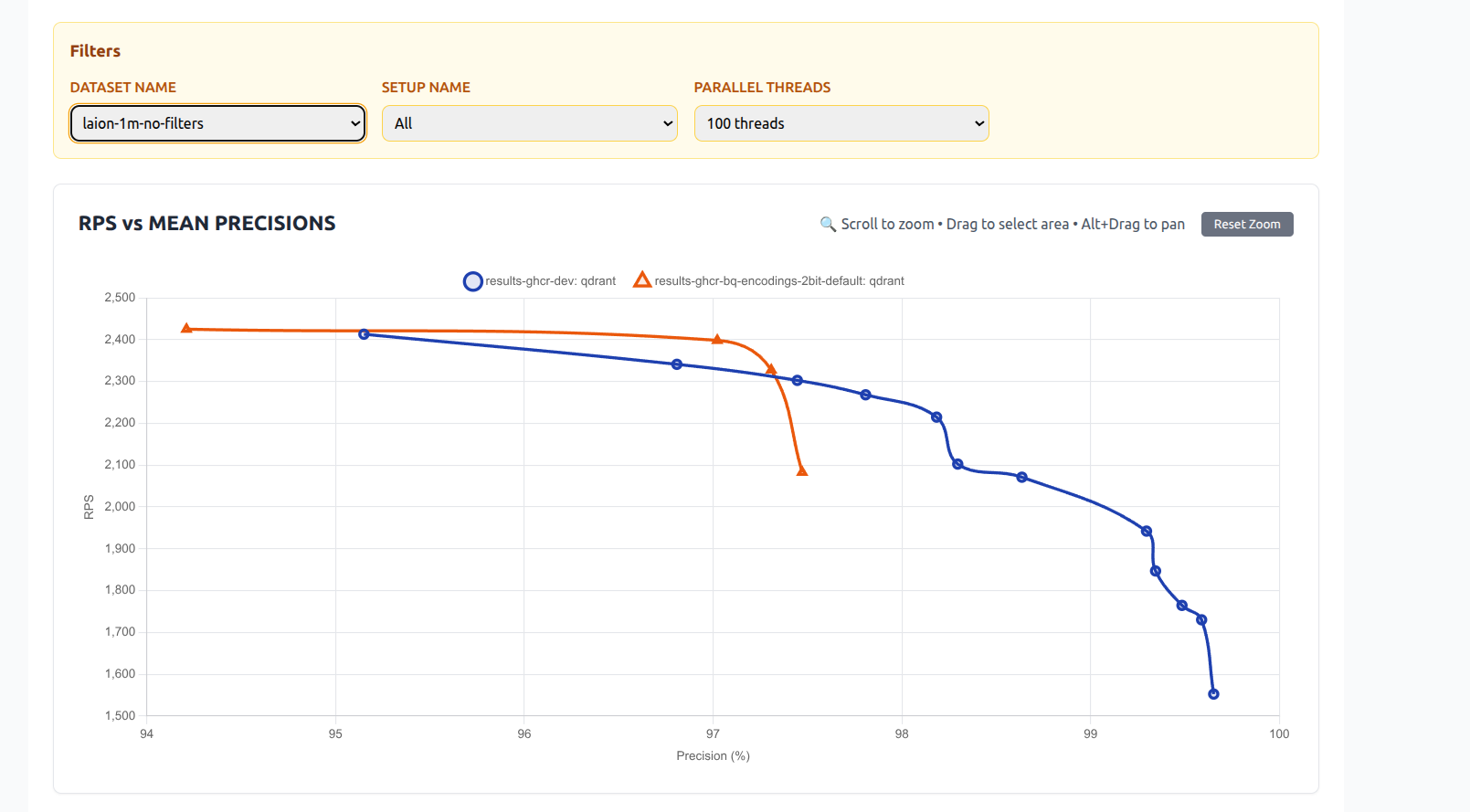
We ran extensive benchmarks to compare the new 2-bit quantization with both traditional 1-bit (binary) quantization and scalar quantization (e.g., 8-bit).

Dataset: Laion 1 million 512d vectors
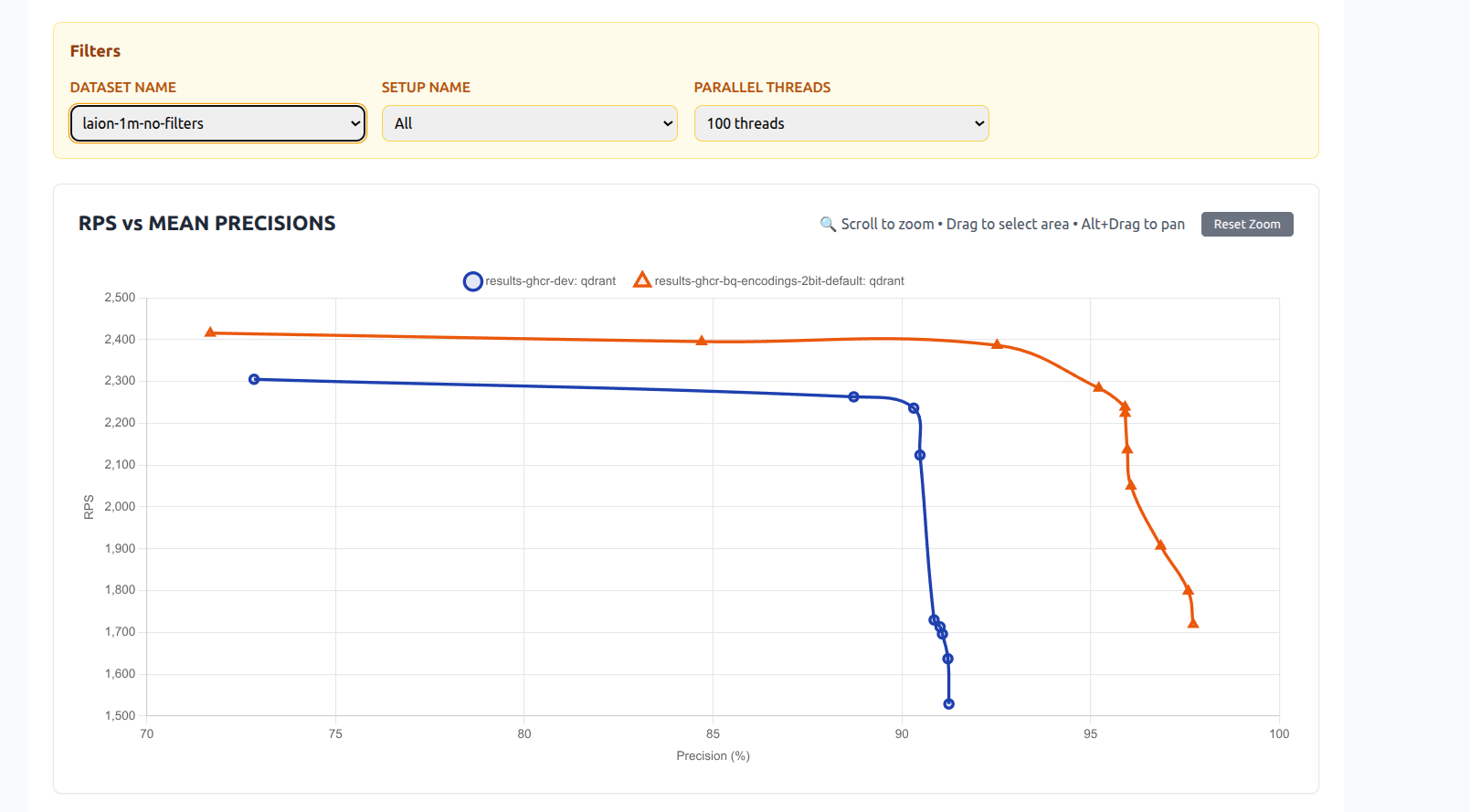
<figure><img src="/blog/qdrant-1.15.x/2bit-vs-1bit.png"
    alt="2-bit VS 1-bit Quantization" width="100%"><figcaption>
      <p>2-bit VS 1-bit Quantization</p>
    </figcaption>
</figure>


<figure><img src="/blog/qdrant-1.15.x/2bit-vs-scalar.png"
    alt="2-bit VS Scalar Quantization" width="100%"><figcaption>
      <p>2-bit VS Scalar Quantization</p>
    </figcaption>
</figure>


</details>


### Asymmetric Quantization

The **Asymmetric Quantization** technique allows qdrant to use different vector encoding algorithm for stored vectors and for queries.
Particularly interesting combination is a Binary stored vectors and Scalar quantized queries.

This approach maintains storage size and RAM usage similar to binary quantization while offering improved precision. It is beneficial for memory-constrained deployments, or where the bottleneck is disk I/O rather than CPU. This is particularly useful for indexing millions of vectors as it improves precision without sacrificing much because the limitation in such scenarios is disk speed, not CPU. This approach requires less rescoring for the same quality output.

![Asymmetric Quantization](/blog/qdrant-1.15.x/asymmetric-quantization.png)

When performing nearest vector search, the query vector is compared against quantized vectors stored in the database. If the query itself remains unquantized and a scoring method exists to evaluate it directly against the compressed vectors, this allows for more accurate results without increasing memory usage.

>  Quantization enables efficient storage and search of high-dimensional vectors. Learn more about this from our [**quantization**](/documentation/manage-data/quantization/index.md) docs.


<details>
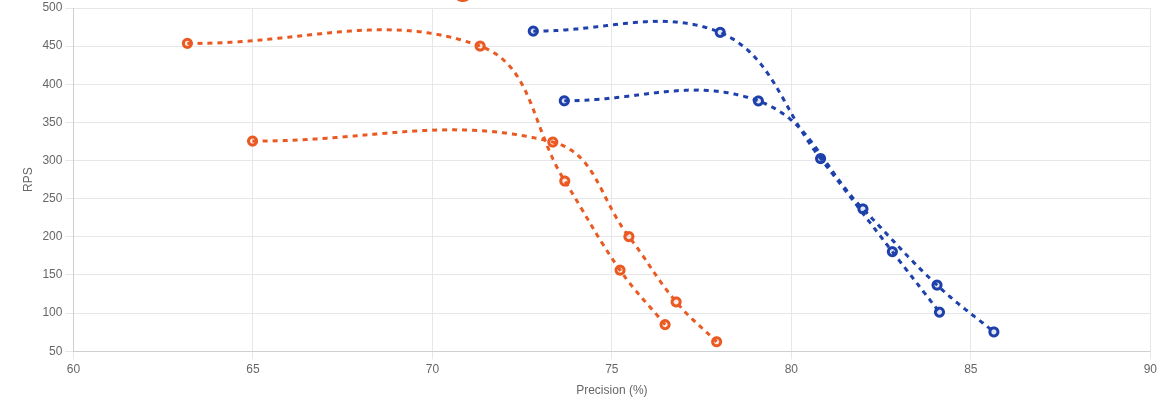
<summary>Benchmarks result</summary>

<figure><img src="/blog/qdrant-1.15.x/asymmetric-bench.png"
    alt="Asymmetric Quantization Benchmark" width="100%"><figcaption>
      <p>Asymmetric Quantization Benchmark</p>
    </figcaption>
</figure>


Blue: Asymmetric 8bit quantization

Orange: Regular Binary Quantization

Dataset: Laion 1 million 512d vectors


</details>


## Changes in Text Index

![Section 2](/blog/qdrant-1.15.x/section-2.png)

Full-text filtering in Qdrant in an efficient way to combine Vector-based scoring with exact keyword match.
And in v1.15 full-text index received a number of upgrades which make vector similarity even more useful.

### Multilingual Tokenization

Previous versions of Qdrant relied on [charabia](https://github.com/meilisearch/charabia) package to perform multilingual tokenizetion.
Unfortunately this package has a significant memory overhead for tokenizers in Korean and Japanese languages, so we could not enable in by default.

With this update you can use a variety of languages in our full-text search index for filters.
This means that languages that don't have clear word boundaries and aren't separated by space such as Japanase and Chinese are now natively supported.
Previously, only languages with spaces were supported (with `"word"` tokenization), or you had to compile Qdrant yourself.

In the new v1.15 release we completely reworked which tokenizer packages are used for specific languages.
It allowed us to pack everything in the main build without sacrificing performance.

Qdrant now supports multilingual tokenization, meaning that search will perform more consistently in multilingual datasets without needing external preprocessing.

Here is how to configure the multilingual tokenizer:

```http
PUT /collections/{collection_name}/index
{
  "field_name": "description",
  "field_index_params": {
    "type": "text",
    "tokenizer": "multilingual"
  }
}
```

### Stop Words

Articles like "a", conjunctions like "and", prepostions like "with", pronouns like "he" and common verbs such as "be", can clutter your index without adding value to search.
Those meaningless works can also complicate construction of filtering condition, when previously you had to manually remove them from the query.

Now you can configure `stopwords` for qdrant full-text index and Qdrant will handle them automatically.

Here is how to configure stopwords:

```http
PUT /collections/{collection_name}/index
{
  "field_name": "title",
  "field_index_params": {
    "type": "text",
    "stopwords": "english"
  }
}
```

For more information about stopwords, see the [documentation](https://qdrant.tech/documentation/manage-data/indexing/#stopwords).

### Stemming

Stemming improves text processing by converting words to their root form.
For example “run”, “runs”, and “running” will all map to the root “run”.
By using stemming you only store the root words, reducing the size of the index and increasing retrieval accuracy.

In Qdrant, stemming allows for better query document matching because grammar-related suffixes that don't add meaning to words get removed.
We apply stemming in our full-text index increasing recall, because a more variety of queries match the same document.
For example the queries "interesting documentation" and "interested in this document", will be normalized to `["interest", "document"]` and `["interest", "in", "this", "document"]`, converting them to an overlapping sets.
However, without stemming, these would become `["interesting", "documentation"]` and `["interested", "in", "this", "document"]`, resulting in not a single word matching, despite being very similar in meaning.

Here is an example showing how to configure the collection to use the [Snowball stemmer](https://snowballstem.org/):

```http
PUT /collections/{collection_name}/index
{
  "field_name": "body",
  "field_index_params": {
    "type": "text",
    "stemmer": {
      "type": "snowball",
      "language": "english"
    }
  }
}
```

### Phrase Matching

With [phrase matching](/documentation/search/filtering/index.md#phrase-match), you can now perform exact phrase search.
It allows you to search for a specific phrase, words in exact order, within a text field.

For efficient phrase search Qdrant requires to build an additional data structure,
so it needs to be configured during creation of the full-text index:

```http
PUT /collections/{collection_name}/index
{
  "field_name": "headline",
  "field_index_params": {
    "type": "text",
    "phrase_matching": true
  }
}
```

For example, the phrase “machine time” will be matched exactly in that order within the “summary” field:

```http
POST /collections/{collection_name}/points/query
{
  "vector": [0.01, 0.45, 0.67, 0.12],
  "filter": {
    "must": {
      "key": "summary",
      "match": {
        "phrase": "machine time"
      }
    }
  },
  "limit": 10
}
```

The above will match:

|  | text |
| -- | --
| ✅ | "The **machine time** is local, rather than global in distributed systems." |
| ❌ | "Dr. Brown retrofitted a DeLorean into a **time machine**." |

## MMR Reranking

We introduce [Maximal Marginal Relevance (MMR)](/documentation/search/search-relevance/index.md#maximal-marginal-relevance-mmr) reranking to balance relevance and diversity.
MMR works by selecting the results iteratively, by picking the item with the best combination of similarity to the query and dissimilarity to the already selected items.

It prevents your top-k results from being redundant and helps surface varied but relevant answers, particularly in dense datasets with overlapping entries.

![MMR example](/blog/qdrant-1.15.x/diversity.png)

### Diversifying Search Results with MMR

Let’s say you’re building a knowledge assistant or semantic document explorer in which a single query can return multiple highly similar queries.
For instance, searching “climate change” in a scientific paper database might return several similar paragraphs.

You can diversify the results with [Maximal Marginal Relevance (MMR)](/documentation/search/search-relevance/index.md#maximal-marginal-relevance-mmr).

Instead of returning the top-k results based on pure similarity, MMR helps select a diverse subset of high-quality results.
This gives more coverage and avoids redundant results, which is helpful in dense content domains such as academic papers, product catalogs, or search assistants.

![Diversifying Search Results with MMR](/blog/qdrant-1.15.x/mmr-example.png)

<figcaption>Without/with MMR when searching for "kebab" in <a href="https://qdrant.tech/documentation/datasets/#wolt-food">Wolt dataset</a> of text-image model</figcaption>

<br>

For example, you have vectorized paragraphs from hundreds of documents and stored them in Qdrant.
Instead of showing only five nearly identical answers, you want your chatbot to respond with diverse answers. Here’s how to do it:

```http
POST /collections/{collection_name}/points/query
{
  "query": {
    "nearest": [0.01, 0.45, 0.67, ...], // search vector
    "mmr": {
      "diversity": 0.5, // 0.0 - relevance; 1.0 - diversity
      "candidates_limit": 100 // num of candidates to preselect
    }
  },
  "limit": 10
}
```

## Migration to Gridstore

![Section 3](/blog/qdrant-1.15.x/section-3.png)

When we started building Qdrant, we picked RocksDB as our embedded key-value store. However, due to it's architecture we ran into issues such as random latency spikes. [Gridstore](https://qdrant.tech/articles/gridstore-key-value-storage/) is our custom solution to this and other challenges we faced when building with RocksDB. Qdrant 1.15 continues our transition from RocksDB to [Gridstore](https://qdrant.tech/articles/gridstore-key-value-storage/) as the default storage backend for new deployments, leading to:

* Faster ingestion speeds.
* Storage management without "garbage collection".

> For more insights on the performance of Gridstore compared to RocksDB checkout our [**Introducing Gridstore**](https://qdrant.tech/articles/gridstore-key-value-storage/#end-to-end-benchmarking) article.

## Optimizations

As usual, new Qdrant release brings more performance optimization for faster and cheaper vector search at scale.

### HNSW Healing

Qdrant 1.15 introduces HNSW healing.

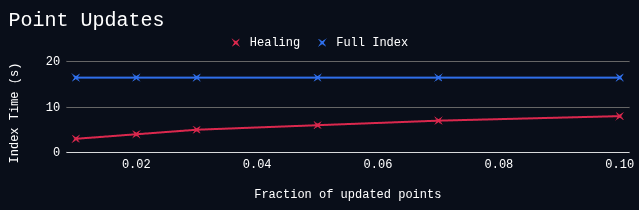
Instead of completely re-building HNSW index during optimization, Qdrant now tries to re-use information from the existing vector index to speed-up construction of the new one.
When points are removed from an existing [HNSW graph](https://qdrant.tech/documentation/manage-data/indexing/#vector-index), new links are added to prevent isolation in the graph, and avoid decreasing search quality.

<figure><img src="/blog/qdrant-1.15.x/healing.png"
    alt="Indexing speed with healing vs full re-index"><figcaption>
      <p>Indexing speed with healing vs full re-index</p>
    </figcaption>
</figure>


This modification, in combinations with [incremental HNSW indexing](/blog/qdrant-1.14.x/index.md#improved-resource-use-during-segment-optimization) introduced in v1.14.0, it significantly improves resource utilization in use-case with high update rates.

### HNSW Graph connectivity estimation

Qdrant builds [additional HNSW links](/articles/filterable-hnsw/index.md) to ensure that filtered searches are performed fast and accurate.

It does, however, introduce an overhead for indexing complexity, especially when the number of payload indexes is large.
With v1.15, Qdrant introduces an optimization, which quickly estimates graph connectivity before creating additional links.

Is some scenarios this optimization can reduce indexation time multiple times without sacrificing search quality.

![Conclusion](/blog/qdrant-1.15.x/connectivity-estimation.png)

## Changes in Web UI

Main Web-UI feature of the release is a `Create Collection` dialog.

This dialog is designed with an idea to guide users through the configuration process.
Instead of listing all possible configurations, we tried to organise it into an intuitive flow that also encourages best-practices.

![create-collection01](/blog/qdrant-1.15.x/create-collection.png)

## Upgrading to Version 1.15

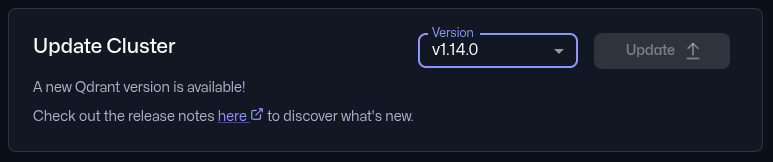
In Qdrant Cloud, simply go to your Cluster Details screen and select Version 1.15 from the dropdown. The upgrade may take a few moments.

> Upgrading from earlier versions is straightforward - no major API or index-breaking changes. We recommend upgrading versions one by one, for example, 1.13 ->1.14->1.15.

<figure><img src="/blog/qdrant-1.15.x/version-upgrade.png"
    alt="Updating to the latest software version from the Qdrant Cloud dashboard" width="100%"><figcaption>
      <p>Updating to the latest software version from the Qdrant Cloud dashboard</p>
    </figcaption>
</figure>


**Documentation**: For detailed usage examples, configuration options, and implementation guides, including quantization, MMR rescoring, multilingual text indexing, and more, refer to the official [Qdrant documentation](https://qdrant.tech/documentation) and [API reference](https://api.qdrant.tech). You'll find full code samples, integration walkthroughs, and best practices for building high-performance vector search applications.

## Engage

![Engage](/blog/qdrant-1.15.x/section-4.png)

We would love to hear your thoughts on this release. If you have any questions or feedback, join our [Discord](https://discord.gg/qdrant) or create an issue on [GitHub](https://github.com/qdrant/qdrant/issues).